Skills Overview
How AGH discovers skills, resolves precedence, injects the prompt catalog, and connects skills to MCP servers.
- Audience
- Operators running durable agent work
- Focus
- Skills guidance shaped for scanability, day-two clarity, and operator context.
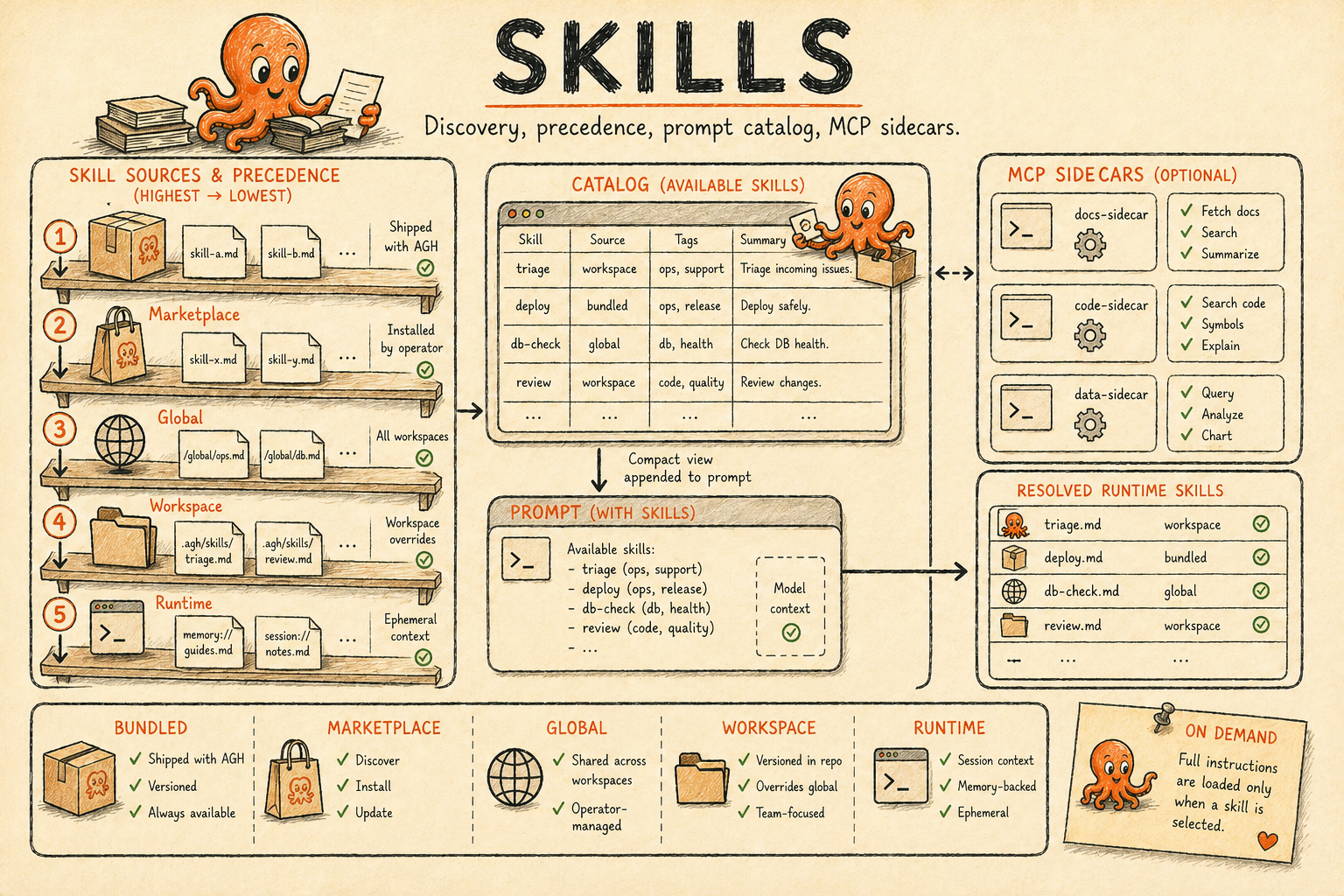
Skills are reusable instruction sets for AGH agents. A skill is a directory with a SKILL.md
file, optional resource files, and optional MCP sidecar configuration. AGH loads skill metadata at
runtime, injects a compact catalog into the startup prompt, and lets the agent read the full skill
only when it needs it.
In this section
SKILL.md schema and authoring
Use this page for the YAML frontmatter, body conventions, MCP sidecars, and skill-local resource files.
Discover and install community skills
Use this page to install, update, and remove ClawHub-sourced skills with `agh skill`.
The skill shipped in the AGH binary
Use this page when you need the bundled `agh` skill, its references, and contextual injections.
What a Skill Contains
<scope>/skills/refactor-checklist/
  SKILL.md
  mcp.json
  references/
    review-template.md
SKILL.md has YAML frontmatter followed by Markdown instructions. The frontmatter gives AGH the
skill name, description, version, and optional AGH-specific metadata. The Markdown body is procedural
guidance for the agent. Resource files stay next to the skill and are read on demand with
agh__skill_view with a file input from inside a session, or with agh skill view <name> --file <path>
from the operator CLI.
The runtime does not keep full skill bodies in list/detail payloads. This keeps prompts, APIs, and the web UI lightweight while preserving the full instruction set for explicit reads.
Source Hierarchy
AGH starts from the filesystem-backed skill layers implemented today, then applies the winning
agent's skills/ directory as a final overlay when one effective agent is selected. Later rows
override earlier rows when the same skill name is visible.
| Precedence | Source | Directory or owner | Notes |
|---|---|---|---|
| 1 | Bundled | compiled into the binary from skills/*/SKILL.md | Lowest precedence. Always available when skills are enabled. |
| 2 | Marketplace | $AGH_HOME/skills/<name> with .agh-meta.json | Installed by agh skill install. Load-time hash verification must pass. |
| 3 | User | $AGH_HOME/skills/<name> | Local operator-controlled global skills. |
| 4 | Additional root | <additional-dir>/.agh/skills/<name> | Visible to workspaces that registered additional roots. |
| 5 | Workspace | <workspace>/.agh/skills/<name> | Highest base precedence for that workspace. |
| 6 | Agent-local | <effective-agent-root>/skills/<name> | Final overlay for the winning agent definition only. |
In short, bundled, marketplace, user, additional root, and workspace form the base stack, then
Agent-local overlays on top. Agent-local is resolved from the winning AGENT.md directory only
after AGH chooses the effective agent definition for that scope. It does not create a separate
skill mode; it only overrides or augments the already-resolved base set.
Public surfaces
The operator and API surfaces resolve the same effective skill set:
- CLI:
agh skill list|info|view|enable|disable --for-agent <name> [--workspace <ref>] - HTTP/UDS:
GET /api/skills?for_agent=<name>&workspace=<path-or-id> - HTTP/UDS detail/content/mutate: the same optional
for_agentandworkspacequery parameters apply toGET /api/skills/{name},GET /api/skills/{name}/content,POST /api/skills/{name}/enable, andPOST /api/skills/{name}/disable
If for_agent is omitted, AGH returns the base effective set for the selected global or workspace
resolution context. If for_agent is present, AGH overlays the winning agent's skills/ tree and
applies that agent's logical skills.disabled tombstones before returning the result.
Enabled extensions can also register runtime-owned skills into the live registry. Those overlays are not filesystem-backed, so they are documented as runtime registry behavior rather than as one more scan root.
Provenance And Shadow Audit
Every skill list/detail payload includes provenance.precedence_tier, which is the resolver tier
that won for that skill: bundled, marketplace, user, additional, workspace, or
agent_local. Marketplace metadata remains in slug, registry, version, and installed_at.
Skills supplied by higher-level runtime packages can also carry installed_from_bundle or
installed_from_extension so operators can trace the owning bundle or extension.
When more than one declaration uses the same skill name, AGH keeps the normal precedence order and
records the losing declarations in provenance.shadowed_by. The full resolver view is available
through the same operator and agent-manageable surfaces:
| Surface | Operation |
|---|---|
| CLI | agh skill where <name> [--workspace <ref>] [--for-agent <name>] |
| HTTP/UDS | GET /api/skills/{name}/shadows?workspace=<ref>&for_agent=<name> |
| Web | Skills detail shows the winning tier, installed-from fields, and every winner/shadowed path. |
The shadows response lists the winner first and marks it with resolved_to_winner: true.
Lower-precedence declarations remain visible with resolved_to_winner: false. AGH also writes a
canonical skill.shadowed event whenever resolver reconciliation detects a shadow relationship,
including daemon boot, workspace resolution, agent-local overlays, and extension/resource updates.
Resolution Flow
Rendering diagram…
The daemon boot path is responsible for the global registry:
- Load bundled skills.
- Load global AGH skills from
$AGH_HOME/skills/. - Start the global watcher when
skills.enabledis true.
The session start path is workspace-aware:
- Resolve the workspace snapshot.
- Discover
<workspace>/.agh/skills/and any registered additional roots. - Overlay workspace-visible skills over the global registry.
- Resolve the winning
AGENT.mdand, if it has askills/directory, overlay those skills last. - Apply agent-scoped logical tombstones from
AGENT.mdskills.disabled. - Build the prompt catalog from enabled skills.
- Resolve MCP servers declared by active skills.
Prompt Injection
The prompt catalog has this shape:
<available-skills>
  <skill name="agh">Operate and extend AGH, the local-first agent operating system...</skill>
</available-skills>

Use `agh__skill_view` with `{ "name": "agh" }` to load full instructions for any skill, or
`agh skill view <name>` from the operator CLI when the tool path is unavailable.
Use `agh__skill_view` with `{ "name": "agh", "file": "references/network.md" }`
(or `agh skill view <name> --file <path>`) to read a
specific skill resource file.
When the runtime denies agh__skill_view for the active scope, agents fall back to
agh skill view. The conditional guidance is part of the rendered catalog so the prompt never
advertises a CLI fallback when the dedicated tool is callable.
Runtime prompts do not repeat the full current-skill catalog after every turn when the resolved
catalog is unchanged for the session. The first prompt, and any later catalog change, carries the
full <current-available-skills> block; repeated turns carry a compact unchanged marker that keeps
the previous block authoritative and points agents back to agh__skill_view for full instructions.
Important details:
| Behavior | Current implementation |
|---|---|
| Full body in prompt | Not injected by the catalog. The body is read on demand. |
| Description length | Descriptions are truncated to 200 runes in the prompt catalog. |
| Disabled skills | Omitted from the catalog. |
| Catalog order | Sorted by skill name after resolution. |
| Prompt position | Memory context is prepended, the AGENT.md prompt stays in the middle, and the skill catalog is appended. |
| Network sessions | Sessions with a network channel also receive agh references/network.md. |
Disabled skills are hidden from the prompt catalog. Current MCP and hook resolution still iterates the resolved skill list, so do not treat disabling a skill as a complete runtime kill switch for MCP or hooks.
MCP Relationship
Skills can declare MCP servers in two places:
metadata.agh.mcp_serversinsideSKILL.md.- A skill-local
mcp.jsonsidecar next toSKILL.md.
The sidecar accepts either mcpServers or mcp_servers. Server names are map keys in the sidecar,
and the sidecar replaces same-name frontmatter servers.
At session start, AGH merges MCP servers in this order:
- top-level config MCP servers
- provider MCP servers
- agent MCP servers
- skill MCP servers
Marketplace skill MCP servers are blocked unless skills.allowed_marketplace_mcp contains one of
the skill's consent keys: the marketplace slug, registry:slug, or the installed hash.
[skills]
allowed_marketplace_mcp = ["@author/postgres-tools"]

[skills.marketplace]
registry = "clawhub"
There is no interactive MCP consent prompt today. Consent is a static config allowlist.
Reload And Failure Behavior
| Case | Behavior |
|---|---|
skills.enabled = false | The registry, catalog provider, skill MCP resolver, watcher, and skill hooks are not wired. |
| Global skill edit | The watcher refreshes global skills on skills.poll_interval, default 3s. |
| Workspace skill edit | Workspace skill cache uses file snapshots and is rechecked when a workspace is resolved. Cache entries expire after 10 minutes. |
| Agent-local skill edit | Agent-local resolution is rechecked when the winning AGENT.md or its skills/ tree changes. Invalid agent-local state is fail-closed for that agent. |
| Missing global directory | Treated as empty. |
| Scan depth | AGH looks for SKILL.md files up to depth 4 under each scanned directory. |
| Scan limit | Each scanned directory is capped at 300 SKILL.md candidates. |
| Critical verification finding | The skill is blocked from loading. |
| Marketplace hash mismatch | The marketplace skill is blocked from loading. |
Related Pages
- SKILL.md Format documents the file format and schema.
- Marketplace shows how to search, install, update, and remove skills.
- Bundled Skill documents the
aghskill shipped in the AGH binary. - Agent Definitions explains how agents and skill-aware MCP servers meet at session start.
- Spawning follows the ACP startup path that receives skill MCP servers.