Configuration Overview
Decide which AGH file, overlay, or environment variable should change when you need to configure one machine, one workspace, one agent, or one skill.
- Audience
- Operators running durable agent work
- Focus
- Configuration guidance shaped for scanability, day-two clarity, and operator context.
Configuration is where AGH stops being generic and starts matching one machine, one workspace, one team default, or one agent role. The key to using this section well is choosing the right surface for the change you actually want.
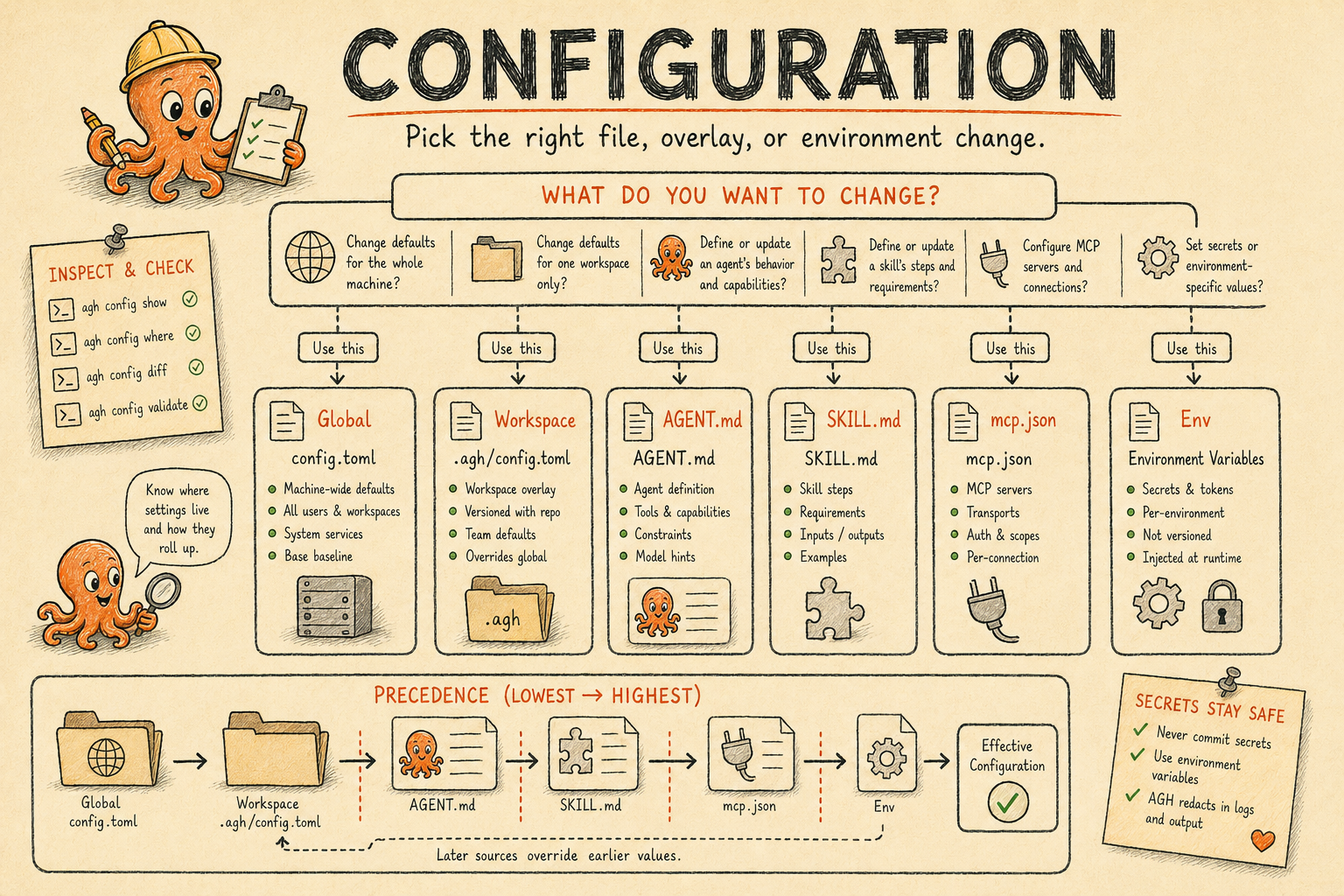
Start with the decision table
| If you want to change... | Primary surface | Reach for this when... |
|---|---|---|
| Machine-wide defaults | ~/.agh/config.toml | The daemon, default provider, permissions mode, HTTP bind address, automation defaults, or marketplace trust should change for every workspace on one machine. |
| One workspace | <workspace>/.agh/config.toml | A repository needs different defaults, limits, or permissions than the rest of the machine. |
| One agent | AGENT.md | A specific agent needs a different prompt, provider, permission mode, or MCP attachment. |
| One agent's advertised capabilities | capability catalog next to AGENT.md | Other peers need outcome-oriented discovery metadata about what that agent can do. |
| One skill | SKILL.md | You are defining reusable instructions, optional MCP metadata, or skill-owned hooks. |
| MCP server configuration | mcp.json | MCP declarations are easier to manage as JSON sidecars than inline frontmatter. |
| Encrypted AGH-managed secrets | Vault | Store write-only vault:<namespace>/... values and inspect redacted metadata through CLI, HTTP, UDS, web, or session-scoped views. |
| Provider authentication | provider settings, native CLI login, credential_slots, or Vault | Let native ACP providers use their own CLI login state, and bind API-key providers to env: or encrypted vault:providers/<provider>/<slot> refs. |
| Filesystem locations and precedence | file-locations reference | You need to know where AGH looks for agents, skills, sessions, memory, or overlays. |
Read in this order
- config.toml
- Config Lifecycle Matrix
- Vault
- File Locations
- AGENT.md
- Agent Capabilities
- SKILL.md
- mcp.json
- Environment Variables
That order mirrors how operators usually troubleshoot AGH: global defaults first, path resolution second, then file-format specifics and agent sidecars.
CLI Inspection and Mutation
Use agh config path before editing to confirm the selected global or workspace overlay. Prefer
agh config set <path> <value> for supported scalar and list settings because it writes through the
same validated persistence path as the settings API. config.toml is desired state; the daemon's
active generation is runtime truth. Every settings write, boot reconcile, and explicit reload is
recorded in config_apply_records.
Use agh config reload after hand edits to reconcile desired state with the active generation. The
same operation is available through POST /api/settings/reload; agents can inspect history through
agh config apply-history or GET /api/settings/apply.
Inspection commands are redacted by default. agh config show, agh config list, and
agh config get <path> replace MCP and environment map values with [redacted] so copied
diagnostics do not leak runtime credentials.
Apply History and Recovery
agh config apply-history lists each apply attempt with desired and active hashes, generation,
actor, lifecycle, status, diagnostics, and next action. Use --status blocked to find changes that
were written to desired state but could not become runtime truth without a daemon restart. Use
--status failed to find validation or subsystem reload failures that should be fixed and retried
with agh config reload.
Status values are intentionally small:
| Status | Meaning |
|---|---|
pending_apply | The daemon has created an audit row and is still trying to reconcile runtime. |
applied | Desired state became the daemon active generation. |
blocked | Desired state was written, but runtime truth needs a restart or new session. |
failed | Validation or a subsystem reload failed; diagnostics describe the retry path. |
next_action tells operators what to do next: none, restart-daemon, new-session, or retry.
AGH does not roll back config.toml after a reload failure; the apply record is the audit surface
that explains why the active generation did or did not advance.